Healthcare Integration Project
HL7 v2 to FHIR Integration Testbed
A reproducible local pipeline for practicing the troubleshooting workflow that integration engineers, application specialists, and PACS administrators rely on every day — reading Mirth's Message Browser, distinguishing transport failures from transformer errors from silent data corruption, and knowing which ACK code means what.
A Python CLI sends MLLP-framed HL7 v2 messages into Mirth Connect, which transforms each one into a FHIR Patient resource and POSTs it to a HAPI FHIR R4 server. Every step is visible in Mirth's Message Browser — the same tool used to debug production interfaces. Nine deliberate error overlays (missing segments, bad date formats, unescaped delimiters, dropped MLLP framing) fill the browser with realistic failure modes so the troubleshooting practice is grounded, not theoretical.
The system at a glance
The testbed runs two services in Docker: Mirth Connect (the integration engine) and HAPI FHIR (the FHIR R4 server). A Python CLI on the host sends HL7 v2 messages into Mirth; a separate curlread path queries HAPI directly. The two flows touch HAPI through different network paths on purpose — an architectural detail with real consequences for debugging.
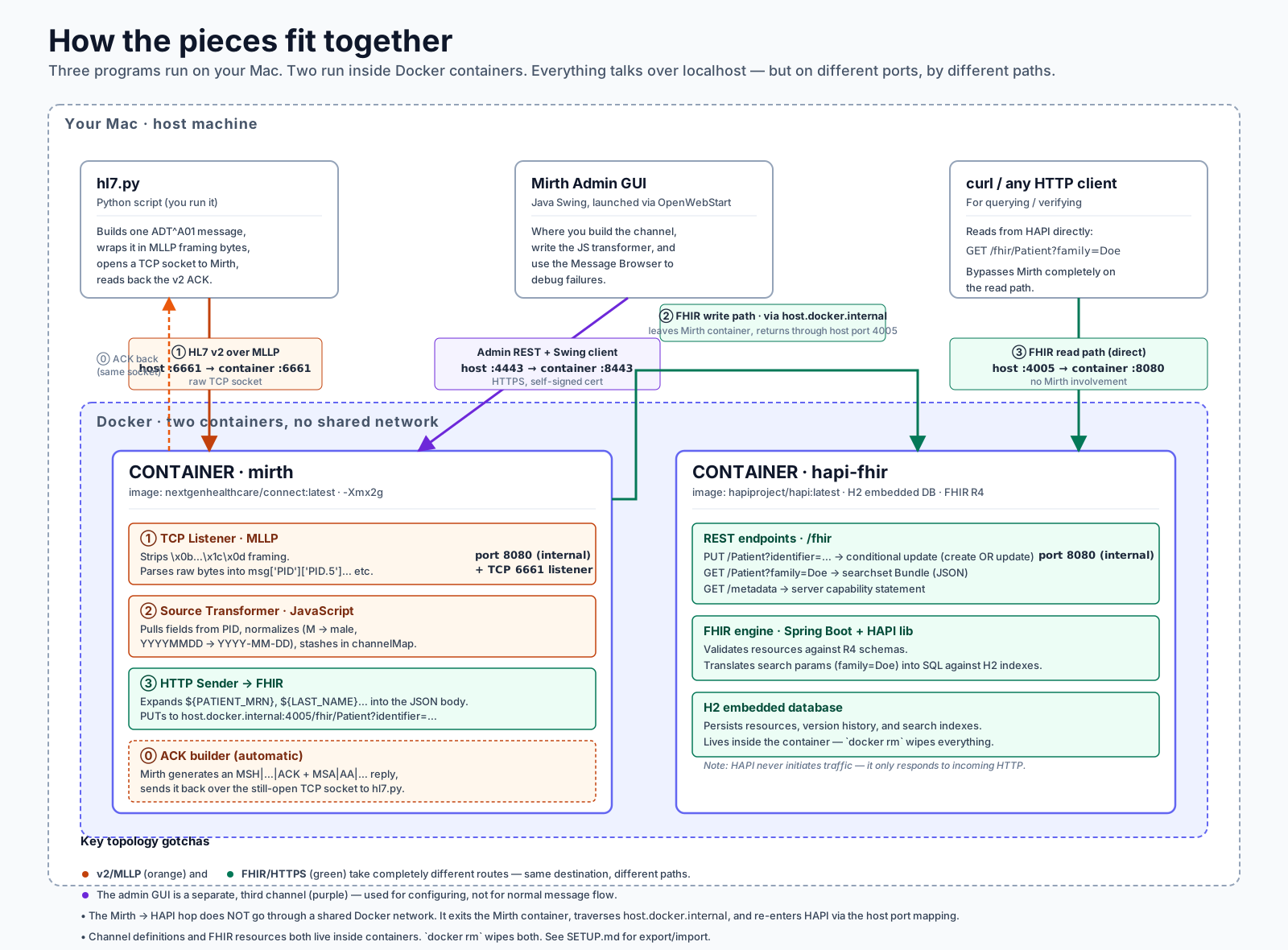
The full host + Docker topology. The write path leaves Mirth, traverses host.docker.internal, and re-enters HAPI through the host port mapping.
One detail worth knowing: the ACK that Mirth returns is generated by Mirth, not by HAPI. An AA(Application Accept) means Mirth accepted the message — it does notmean HAPI stored it successfully. Production systems usually wire Mirth's response transformer to inspect HAPI's HTTP status and downgrade the ACK to AE or AR on failure; otherwise senders get false confirmations. This testbed keeps the naïve behavior on purpose, because spotting that gap is one of the things the project teaches.
Two standards, one hospital
HL7 v2 (from 1989) is pipe-delimited messaging over MLLP/TCP. FHIR (from 2014) is REST and JSON over HTTP. Hospitals run both side-by-side — v2 carries the high-volume real-time event traffic (admissions, lab results, imaging orders) while FHIR is the modern API surface that web and mobile apps consume. “Integration troubleshooting” in this world almost always means making v2 traffic produce correct FHIR resources, which is why this testbed exists.
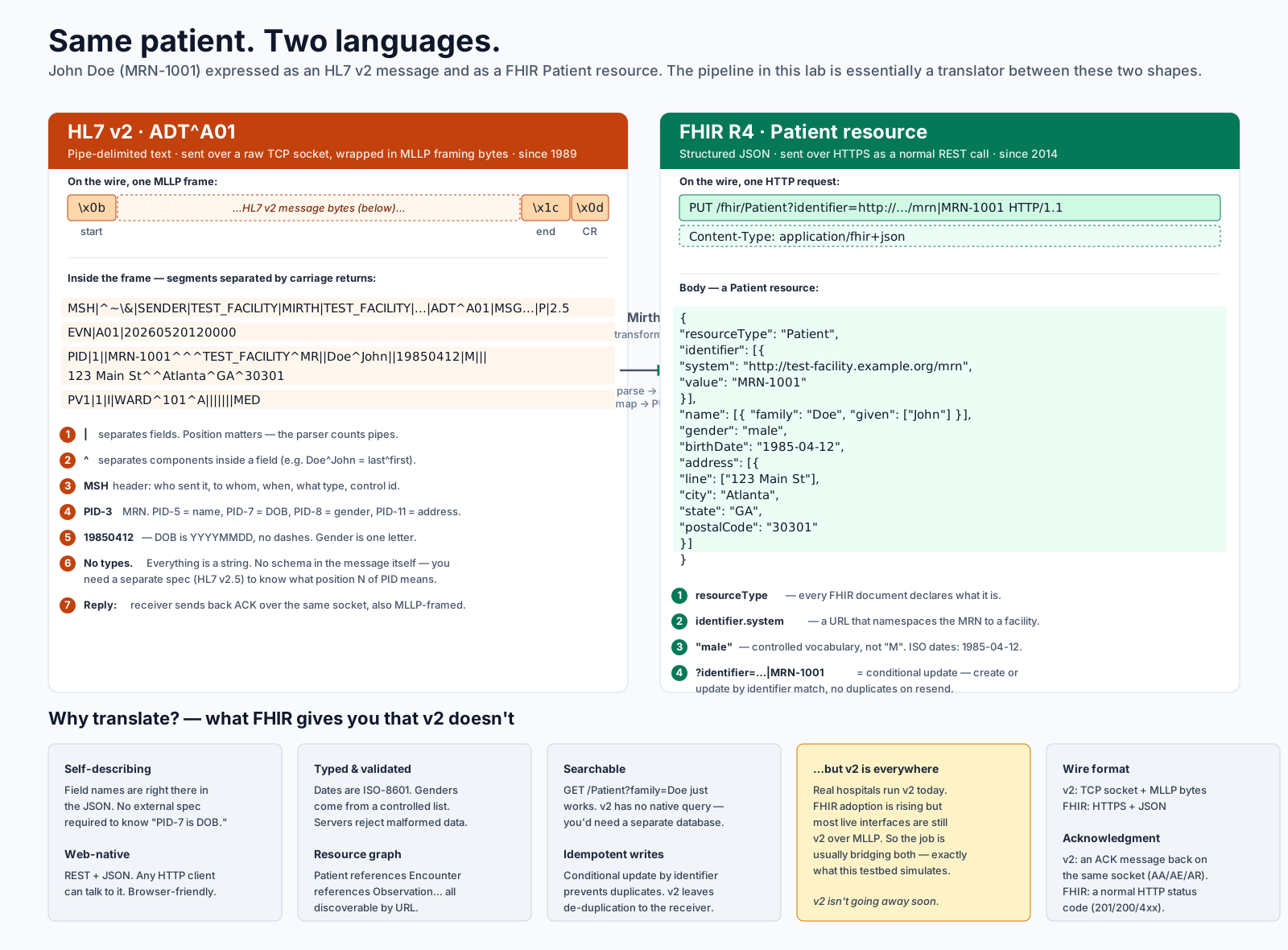
Same patient, two representations. Both standards encode the same clinical facts but with completely different wire formats and structural assumptions.
A field-by-field mapping looks straightforward on a slide. In practice the work hides in the edge cases: a date with no separators, a gender code the spec doesn't list, an unescaped delimiter that shifts every PID component one slot to the right. The error overlays in this project reproduce each of those, so the symptoms become familiar before they show up in production.
Inside Mirth Connect
Mirth (also called NextGen Connect) is the most widely deployed integration engine in U.S. healthcare. Its building block is the channel: a one-way pipeline with a source (where data arrives) and one or more destinations (where transformed data gets sent). Each channel has filters and transformers that mutate the message as it flows through.
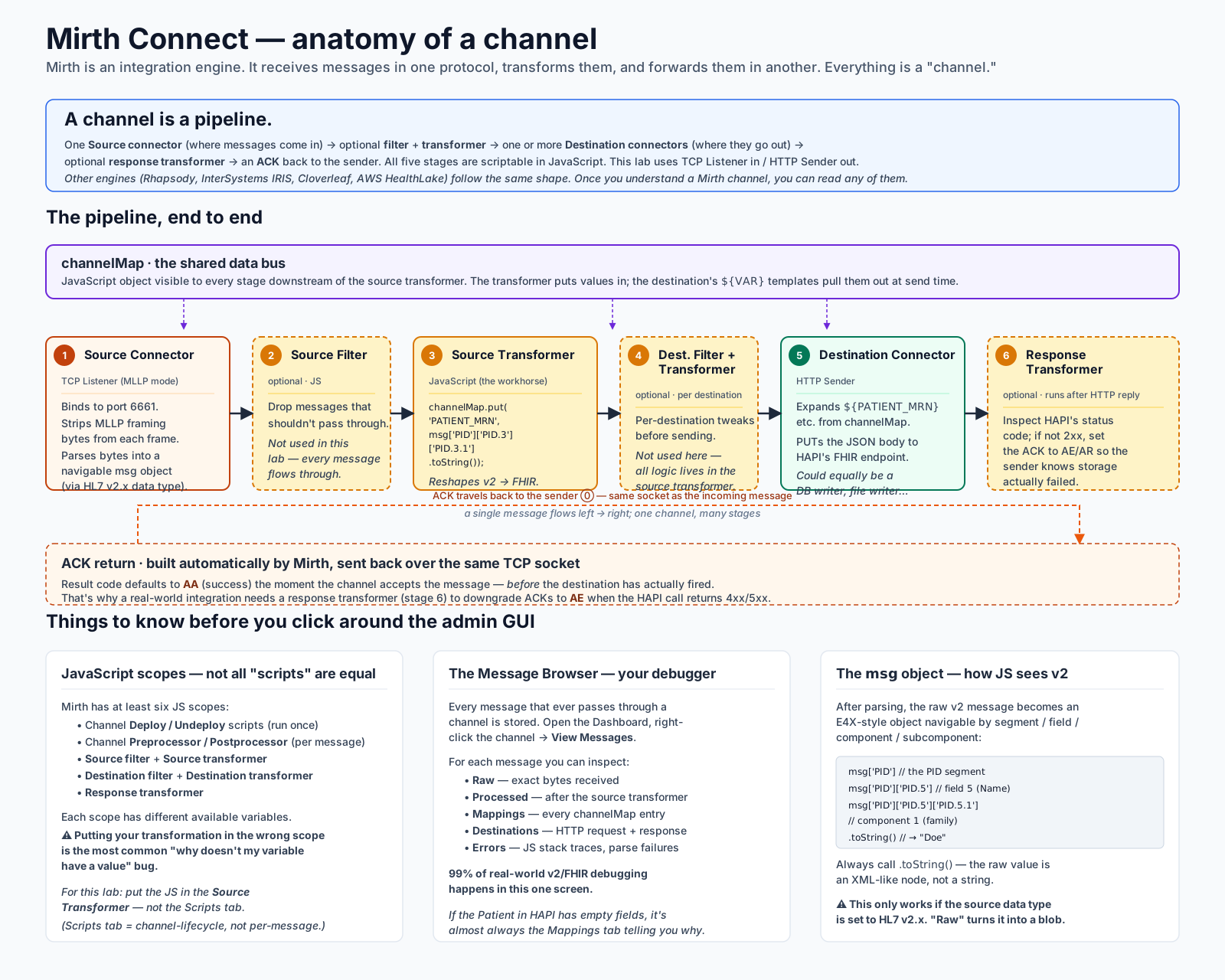
The integration-engine pattern: listener → filter → transformer → destination. Once you know this shape, Rhapsody, InterSystems IRIS, Cloverleaf, and Corepoint all read the same way.
In this testbed the channel is small but complete: a TCP listener on port 6661 that strips MLLP framing, a JavaScript source transformer that normalizes PID fields (date format, gender code) into a channelMap, and an HTTP Sender destination that expands those values into a FHIR Patient JSON body and PUTs it to HAPI. The whole thing fits on one screen of Mirth's admin client — which is precisely the point. The admin GUI is where most of the day-to-day work of an interface analyst happens, and being comfortable navigating it is the skill the project trains.
Inside HAPI FHIR
HAPI FHIR is the reference implementation of a FHIR server — the open-source project that most commercial FHIR servers (including a substantial share of EHR vendor offerings) build on or fork from. The server handles resource validation, search indexing, and persistence; in this testbed it uses an in-process H2 database, which is what makes the whole stack run on a laptop without any external dependencies.
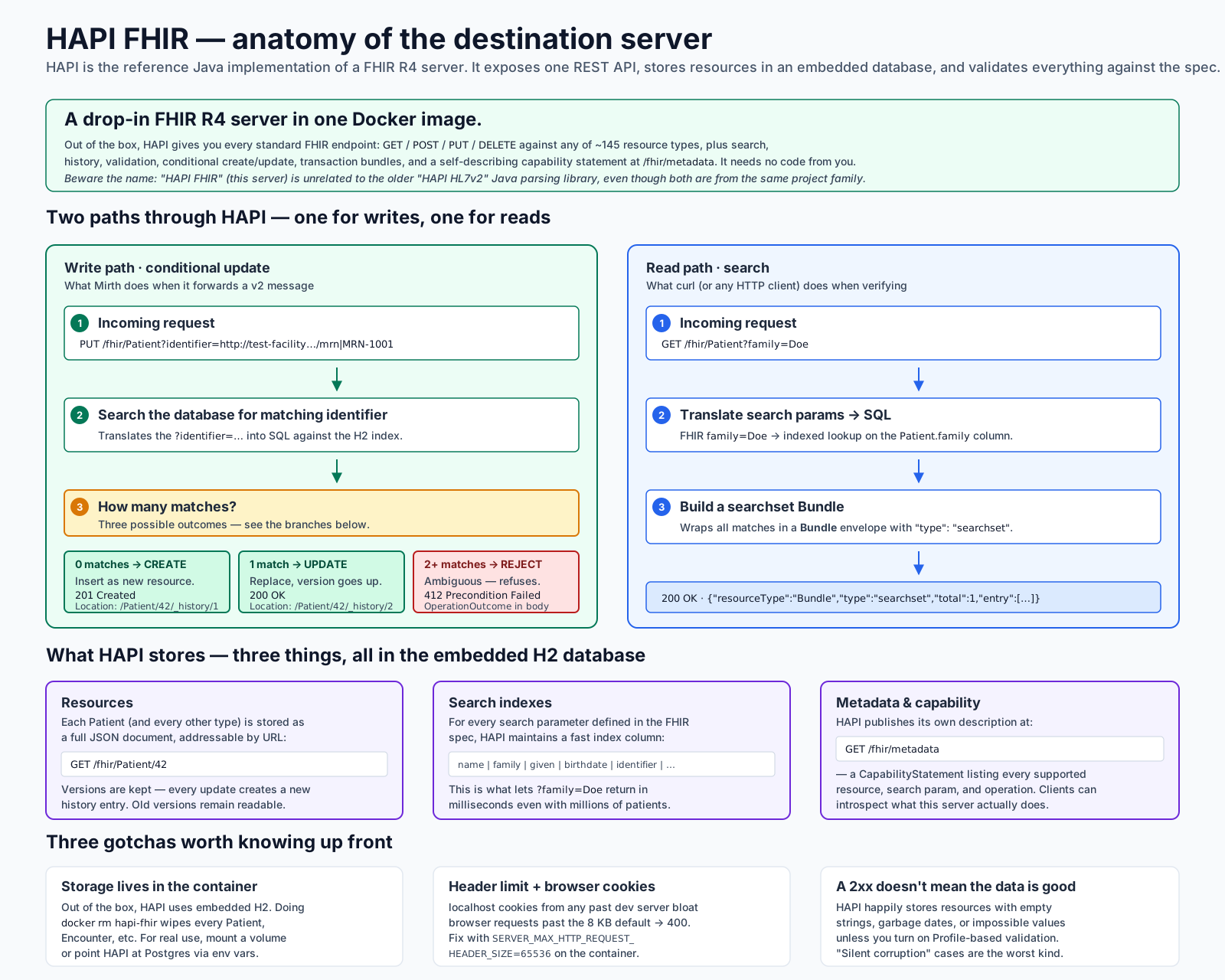
HAPI FHIR’s internal layout. The REST layer accepts resource operations; the resource providers validate against FHIR profiles; the persistence layer indexes searchable fields into H2.
Two FHIR-specific behaviors are worth pointing out, because they shape how the testbed feels to use. First, conditional update: when Mirth PUTs to /fhir/Patient?identifier=...|MRN, HAPI searches for a Patient with that identifier, updates the resource if found, creates it if not, and returns 200 or 201accordingly. That's why re-sending the same canonical patient doesn't produce duplicates. Second, search bundles: a GET that matches multiple resources comes back wrapped in a Bundle of type searchset, not as a raw array — a FHIR-ism that surprises engineers used to plain REST.
Following one message end to end
The clearest way to internalize how the pieces fit is to follow one message through the whole pipeline. From the CLI building the HL7 v2 bytes, through MLLP framing on the wire, through Mirth's parser and transformer, through the HTTP PUT, through HAPI's conditional update, all the way back to the ACK the CLI prints. Every step has a place in the Message Browser; every step has a failure mode an error overlay can trigger.
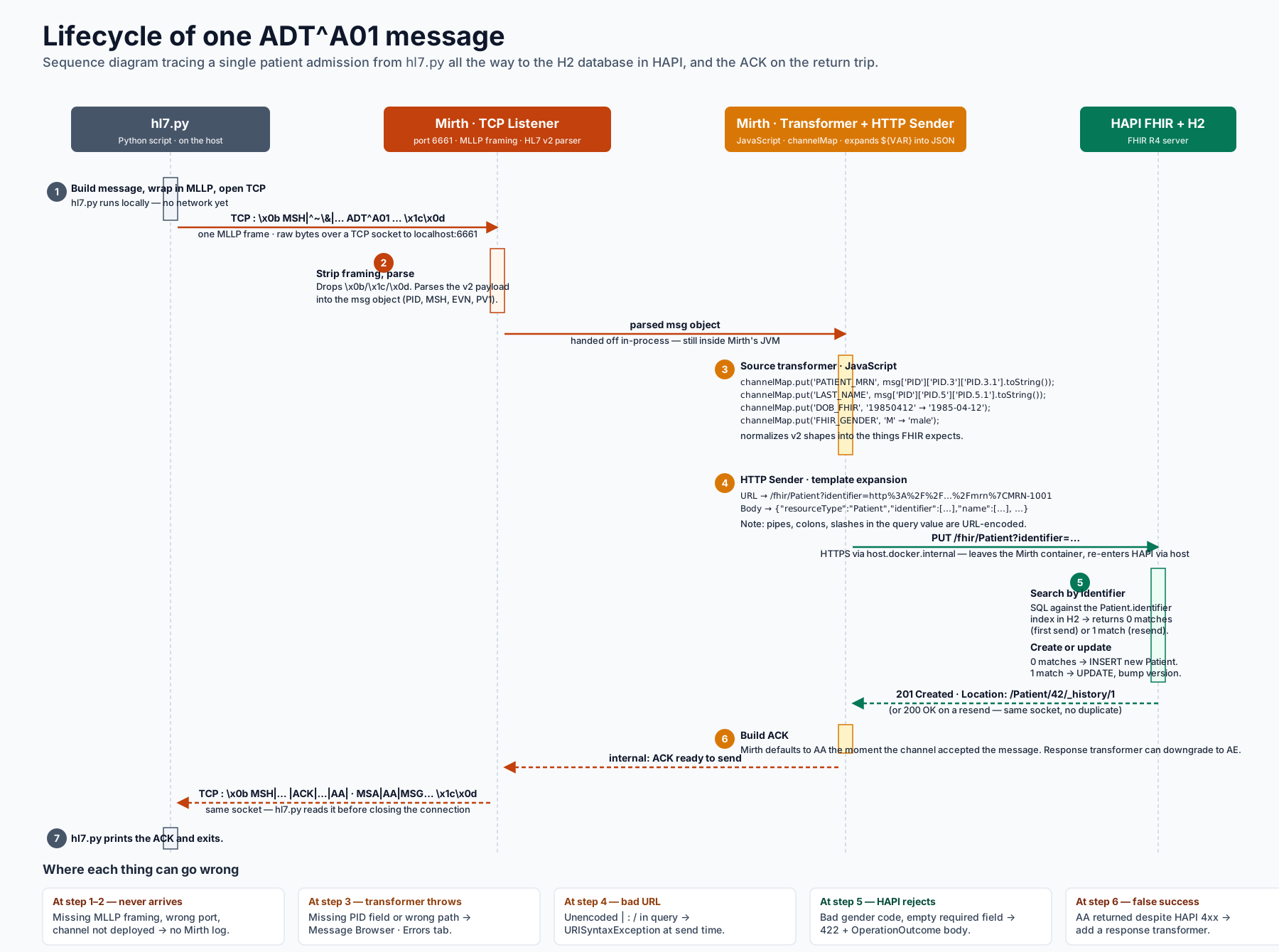
One ADT^A01 message, ten labelled checkpoints. Each checkpoint corresponds to a tab in Mirth’s Message Browser where you can see exactly what the data looked like at that moment.
The pedagogically interesting failure modes are the silent ones. A non-standard date format makes birthDateextract as an empty string — Mirth still returns AA, HAPI happily stores the Patient, and nobody notices until somebody queries the data weeks later. The Message Browser's Mappings tab is the only place that surfaces the problem at the moment it happens. Knowing to look there, and knowing what a healthy channelMaplooks like compared to a malformed one, is the difference between “the interface is fine” and “the interface is fine and I checked.”
Reference: the acronyms
Every healthcare interoperability conversation accumulates acronyms quickly. This one-page glossary collects the terms that come up across the rest of the project.
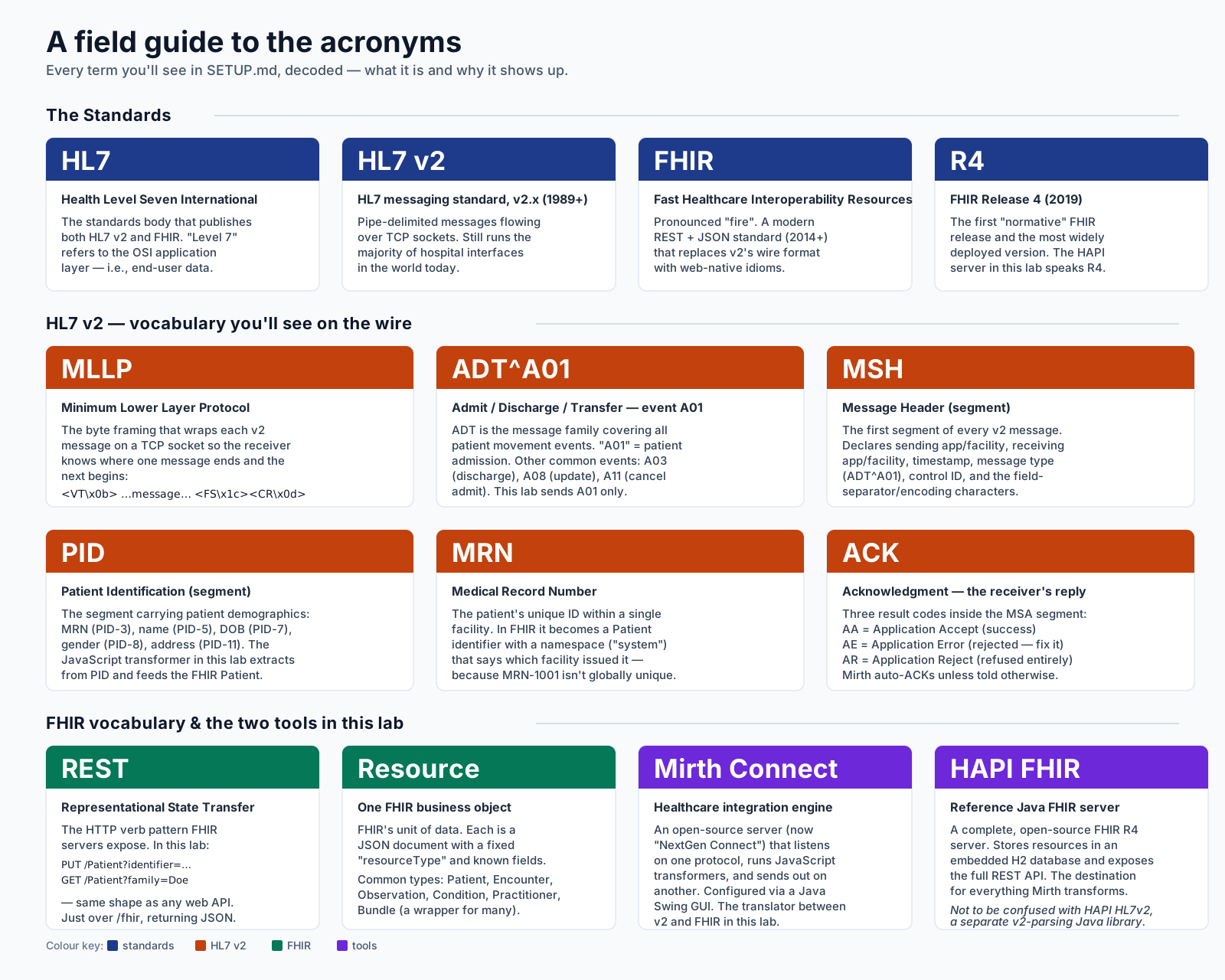
The acronyms that appear in every HL7 integration job description, with one-line definitions.
Why I built this
The job of an interface analyst is not writing channels — vendors and consultants do most of that. The job is reading the Message Browser when something has gone wrong, forming a hypothesis about which stage of the pipeline broke, and either fixing it or filing a precise enough ticket that someone else can. That work is hard to practice without access to a real integration engine and real failure traffic. This testbed makes both available on a laptop, with deliberate failures already wired up, so the practice loop is short and the feedback is honest.